You type a prompt, and twenty seconds later there it is: a gorgeous logo, a striking banner concept, a poster design that looks better than anything you could have briefed. You download the JPEG, email it over, and ask us to print it. Then comes the reply you weren't expecting: the file needs to be rebuilt before it can go to press, and that's design work.
It's the single most common file-preparation conversation we have with Tulbagh businesses now, and we completely understand the frustration. The image is beautiful. So why can't we just print it?
The short answer: AI image generators create pictures for screens. Printing presses need something different. This article shows you exactly why, with side-by-side examples, so you know what to expect, and how to use AI in a way that saves you money instead of costing you extra.
Print-ready means vector. AI images are pixels
Every digital image falls into one of two families.
A raster image, such as a JPEG, PNG or screenshot, is a fixed grid of coloured squares called pixels. It has one hard-coded size. Zoom in far enough and you see the individual squares.
A vector file such as AI, EPS, SVG, DXF, DWG or a print PDF stores shapes as mathematical paths: "draw a circle here, this curve, that line." Because the shape is maths rather than pixels, the same file prints razor-sharp on a business card and on a 5-metre building sign. SVG, the format browsers display, is part of this family, and it is a safe export choice from most design tools. DXF and DWG are the CAD and cutting formats our vinyl and laser machines read. One warning: an SVG or PDF that simply embeds a picture still carries pixels inside. The artwork itself has to be made of paths, not a photo wrapped in a vector file.
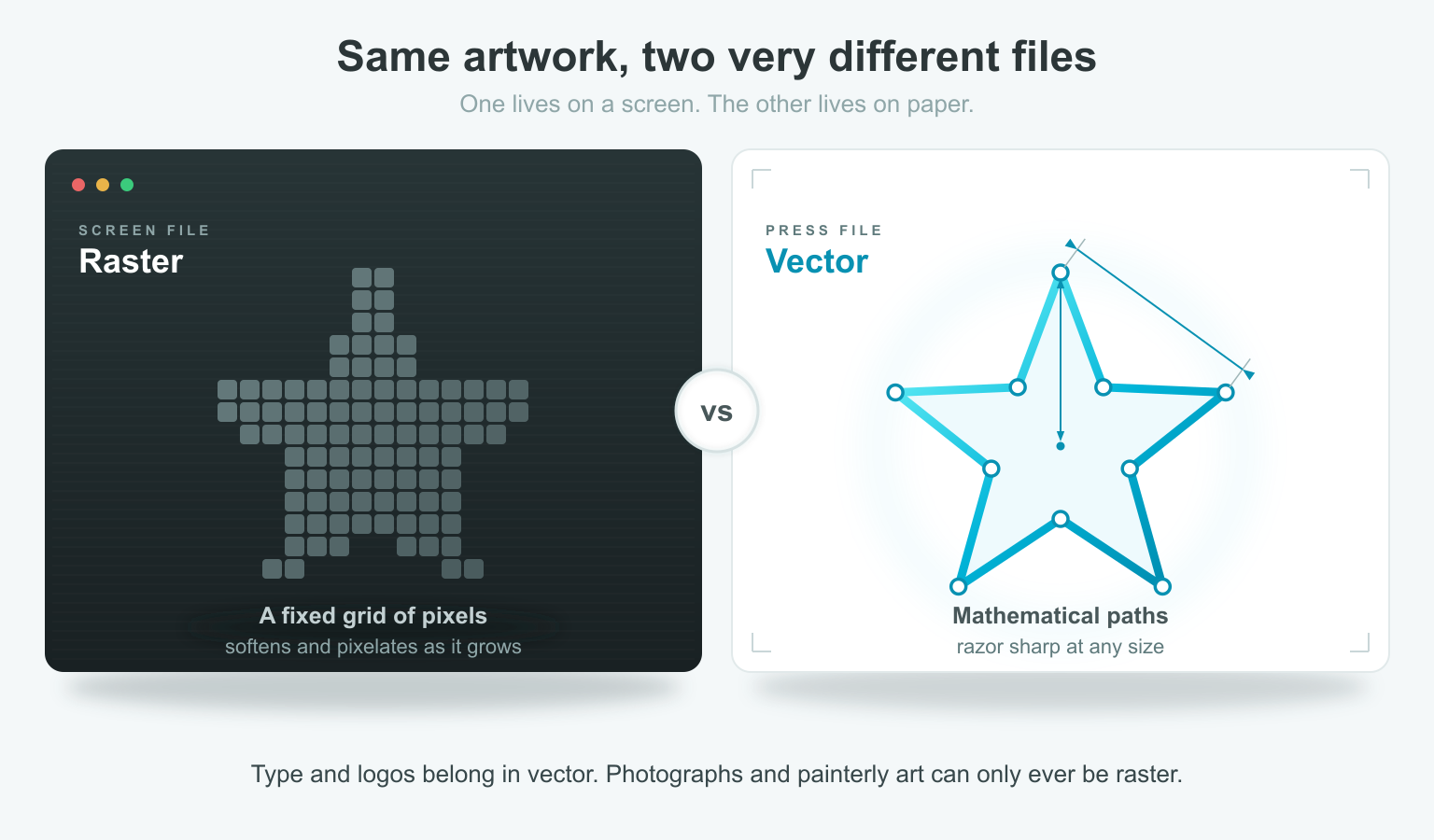
AI image generators output raster. Always. That's not a flaw in the tools. Photorealistic images can only exist as pixels. But it means the file you downloaded is frozen at its export size, while a print shop needs artwork that can scale to the physical size of your product.
The resolution problem, in real numbers
Print quality is measured in DPI, or dots per inch. The industry standard for anything viewed up close is 300 DPI at final print size. Screen images are typically fine at 72 to 150 DPI, which is why AI images look flawless on your monitor and fall apart on paper.
Here is what happens to one typical AI export, 2,048 pixels wide, when you place it at different print sizes, from a business card up to a banner for a Tulbagh event:
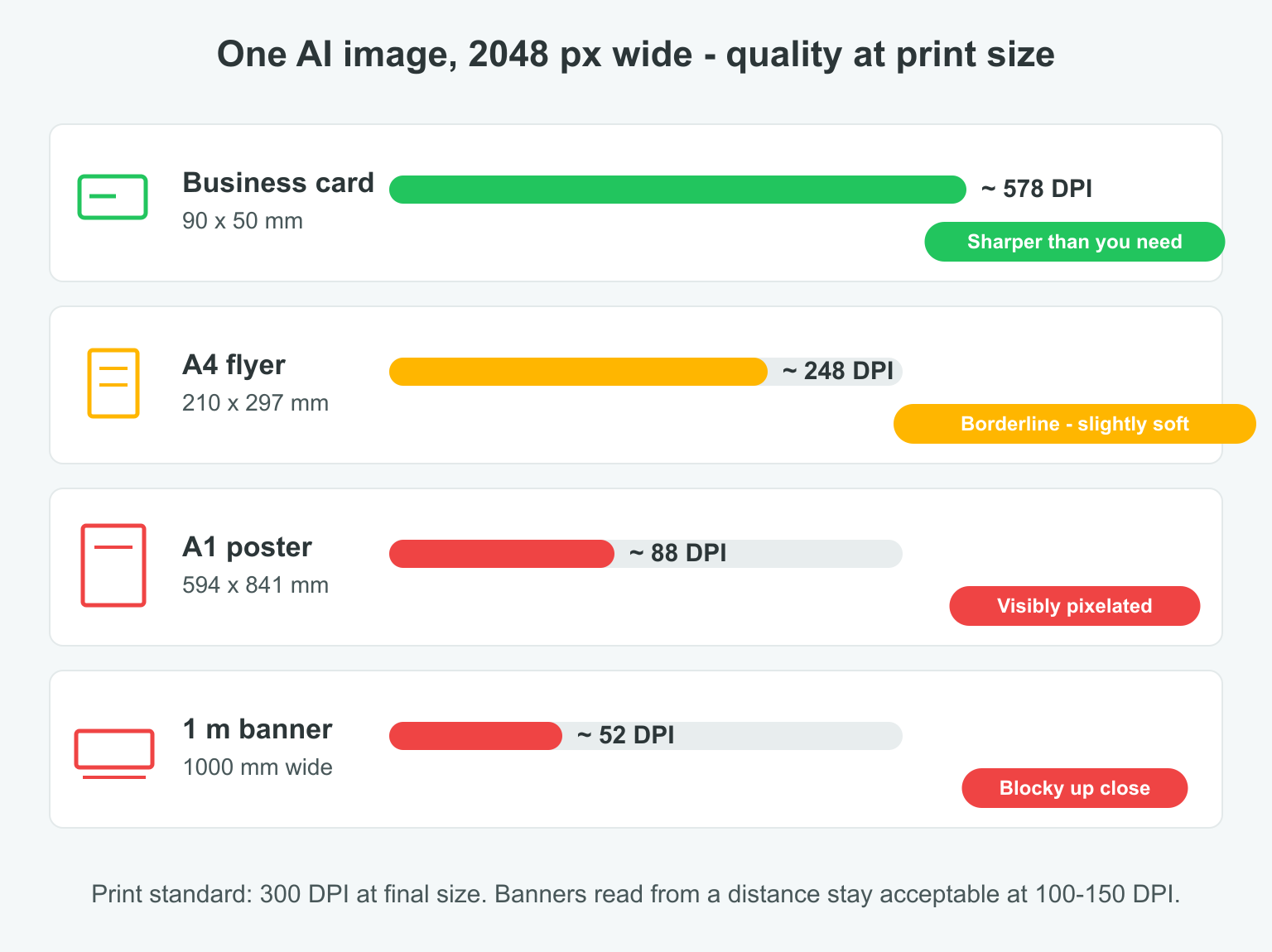
Notice the business card passes with room to spare. This is why the problem feels inconsistent: small items genuinely do print acceptably from a screen-resolution file. But stretch that same file across an A1 poster and it's a mosaic of visible squares. There is no button that recovers this detail. Enlarging a raster image spreads the same pixels across more paper. AI "upscalers" can help, but they invent detail that wasn't in the original, and at print magnification that invention shows up as smearing and inconsistent texture.
The colour problem: your screen lies (a little)
Screens and presses speak different colour languages. Screens mix RGB, which is red, green and blue light. Presses mix CMYK: cyan, magenta, yellow and black ink. RGB can produce vivid, glowing colours that simply cannot be mixed from paper inks.
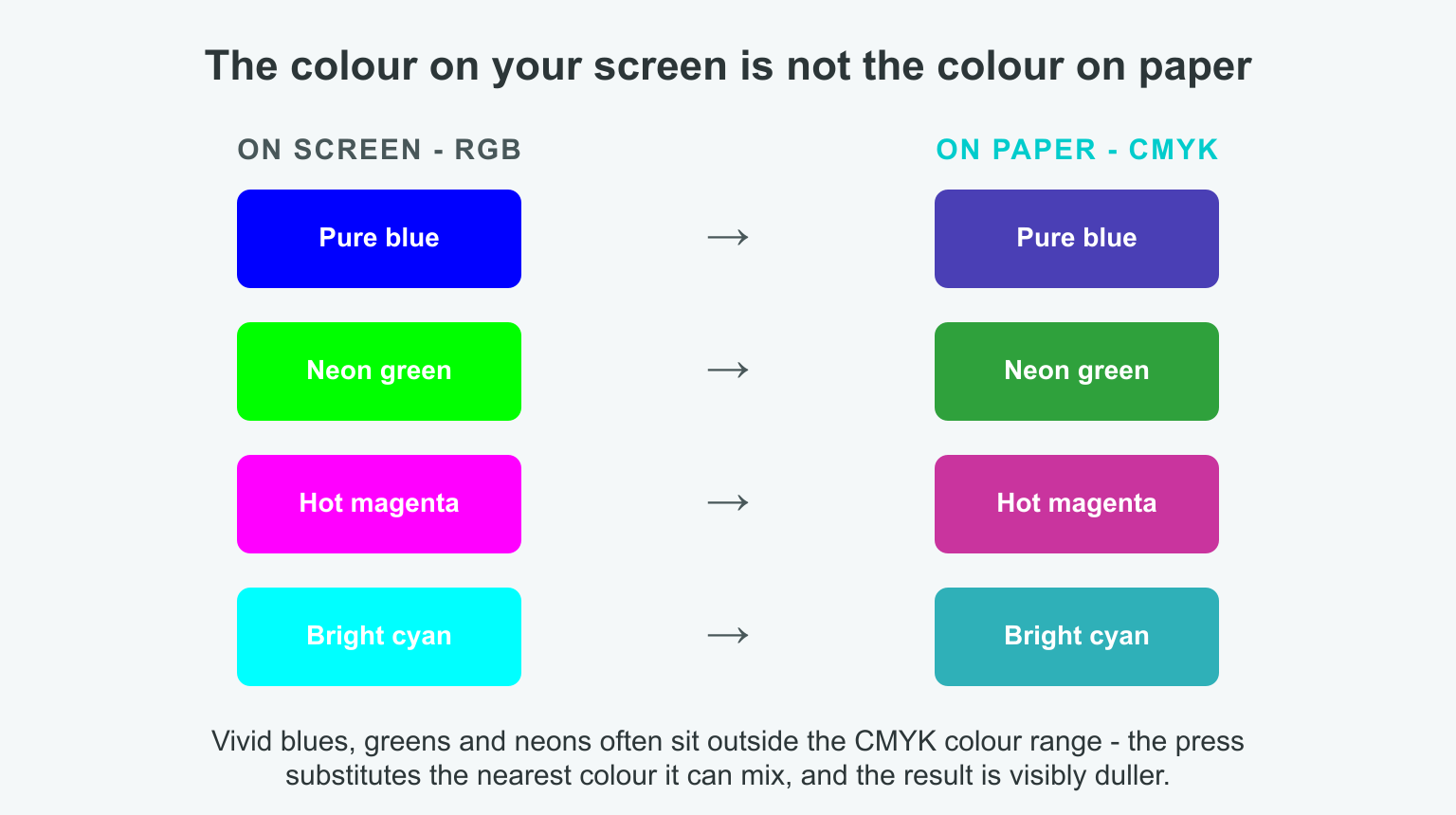
AI images are RGB by default. When a glowing neon blue or green hits the press, the printer substitutes the closest colour ink can actually produce, and the result is visibly duller than what you approved on screen. A professional file is converted to CMYK before printing, with problem colours corrected deliberately rather than by machine guesswork.
Three things a flat JPEG simply cannot carry
Beyond resolution and colour, three print essentials have nowhere to live in a flat image file:
- Editable text. In a vector file, your business name is live type: razor-sharp at any size, correctable in seconds. In an AI image, the lettering is just pixels, and AI-generated text is still famously unreliable, with misspelled words and invented characters. It has to be retyped as real text regardless.
- Bleed. Paper is trimmed after printing, and the guillotine is never perfectly on the line. Printers ask for 3-5 mm of artwork extending past the trim edge so no white slivers appear. An AI image ends exactly at its own edge. There is nothing to trim into.
- Cut paths. This one matters for stickers, decals, and cut vinyl. Cutting machines follow vector outlines. A flat picture has no outline for the machine to follow, so die-cut shapes are impossible from the file alone.
The 30-second print-readiness check
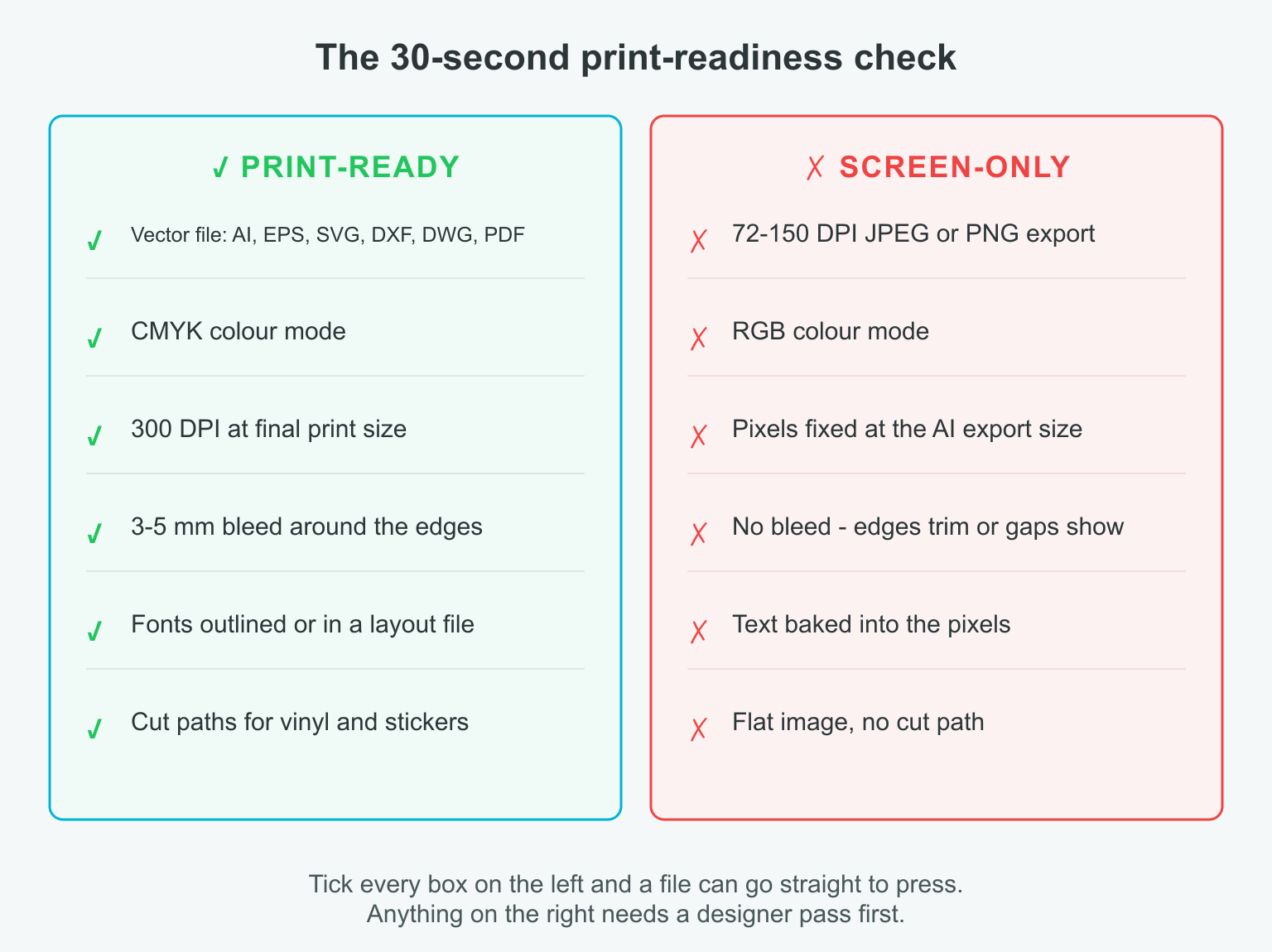
Run your file through that checklist before you send it anywhere. If it ticks the left column, it can go straight to press. If it lives in the right column, as every raw AI export does, it needs a designer pass first.
Using AI well: spend it on the idea, not the file
None of this means AI artwork is wasted money. Used correctly, it's a genuine head start. The mistake is treating the generated image as the deliverable instead of the brief.
- Use AI for the concept. An AI image communicates your vision to us faster than a page of description. That has real value. It shrinks the design conversation.
- Keep text out of the picture. Ask the AI to leave space where text should go, and send us the wording separately. We set it as real, sharp, editable type.
- Favour flat colours and simple shapes. These convert to production-ready vector artwork quickly and faithfully. Painterly textures and busy photographic effects are the slow, expensive cases.
- Export at the largest size the tool offers, and don't screenshot or re-compress it along the way.
- Send your brand assets with it: your exact wording, logo file and brand colours, so the rebuild is faithful.
What about the software that converts pixels to paths?
It exists, and it's genuinely useful. Automated raster-to-vector conversion can trace a clean logo shape into paths in seconds. But it is not a magic fix, and it is not foolproof. The software has to guess where every edge belongs, so painterly textures, gradients, shadows and busy photographic detail come out as lumpy, posterised approximations or hundreds of messy fragments. Type traced this way is never quite the crisp, correct letterform it should be. A designer still has to clean up the result, decide which shapes matter, and rebuild the rest, which is why auto-tracing saves time on simple artwork and adds rework on complex artwork. It's a tool in the process, not a replacement for it.
From your AI image to a printed product
- Generate your concept. Iterate in the AI tool until the composition, mood and colour direction feel right.
- Send it to us with the essentials. Attach the AI image plus your exact text, logo and brand colours.
- We rebuild the production file. Vector recreation where it counts, CMYK colour correction, bleed and cut paths added.
- You approve a proof. We show you the press-ready version before anything is printed. What you approve is what ships.
- We print. Sharp type, correct colour, clean trims, on the material suited to the job.
What you're actually paying the designer for
This is the expectation to reset: when your AI artwork comes back with a design fee attached, nobody is charging you to "come up with an idea." The idea arrived with your file. The fee covers production engineering: rebuilding shapes as scalable paths, retyping text, correcting colours for ink, adding bleed and cut paths, and preparing a file the press and the cutter can both execute flawlessly.
A useful way to think about it: AI wrote the first draft. Print is publishing, and publishing has standards that a raw draft doesn't meet, in exactly the same way a clever voice note isn't yet a signed contract.
Bring us the AI image anyway. It's the best design brief you've ever been able to hand a print shop. We'll take it from there.
Ready to print your AI concept? Request a quote from Winelands Printing & Signage. Send us the file and we'll tell you exactly what it needs, with delivery across the Western Cape and right here in Tulbagh.